

Creating multi-character anime images can be both exciting and challenging. With the Anime AI Generator, artists and enthusiasts can produce detailed scenes featuring multiple characters interacting in a coherent, visually appealing way. Whether you want to depict a romantic couple, a group of friends, or a dynamic battle scene, this tool provides intuitive options to generate multiple characters while keeping the style consistent.
The Anifun Anime AI Generator combines powerful AI models with an extensive library of style Loras, allowing users to define character appearances, actions, and interactions. It ensures that all characters in a scene maintain visual consistency and harmonize with the background, making it ideal for creating multi-character compositions for personal projects or professional illustrations. In this guide, we will walk through understanding multi-character scenes, writing effective prompts, and leveraging Anifun’s features for the best results.
Understanding Multi-Character Anime Images
Before generating multi-character images, it’s important to grasp what constitutes a multi-character scene and the key challenges involved.
Types of Multi-Character Scenes
- Couple or CP Scenes: Two characters interacting intimately, such as holding hands, laughing together, or sharing a quiet moment.
- Group or Team Scenes: Three or more characters participating in activities like celebrating a festival, hanging out at a café, or battling enemies.
- Dynamic or Event Scenes: Large groups interacting in complex scenarios such as fantasy adventures, sports competitions, or school events.
Common Challenges in Multi-Character Images
- Character Proportions: Ensuring each character’s size and scale are appropriate relative to others.
- Interaction Accuracy: Depicting believable poses and gestures between characters.
- Expression and Pose Consistency: Maintaining personality and style across multiple subjects.
Why Consistency Matters
When generating multi-character images, visual consistency is crucial to maintain the integrity of the scene. Inconsistent proportions, mismatched styles, or poorly aligned interactions can make even high-quality illustrations look off. Anifun helps solve this by allowing consistent style application, iterative generation, and prompt-guided control.
Prompt Techniques for Multi-Character Images
Crafting clear and detailed prompts is essential for generating multi-character scenes that look natural and cohesive.
Structuring Prompts for Multiple Characters
Start by defining each character individually in the prompt. Describe their appearance, outfit, expression, and action. A structured approach ensures the AI understands each role distinctly.
Using Names for Character Consistency
Explicitly including character names in the prompt helps the AI track each character throughout the scene. This is particularly important in couples or group scenes where interactions matter.
Example Prompt: Naruto: spiky blonde hair, orange ninja outfit, smiling and holding hands with Sakura. Sakura: pink hair, red ninja outfit, blushing and looking at Naruto. Background: cherry blossom trees, petals falling, soft sunlight.
In this prompt, the AI clearly identifies each character and their interaction, producing a coherent scene.
Describing Actions and Interactions
- Include movements, gestures, and interactions between characters.
- Use phrases like “standing side by side,” “laughing together,” or “fighting in unison.”
- Adding relationship cues ensures the scene feels lively and connected.
Combining Style Loras for Cohesive Output
- Apply style Loras to unify characters’ visual style with the environment.
- For example, a cel-shaded Lora can be combined with a lighting-focused Lora to maintain harmony.
- Iteratively test combinations for the best visual result.
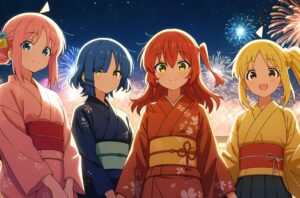
bocchi the rock girl made by Anifun
Tips and Tricks for Polished Multi-Character Images
Even with strong prompts, several techniques can help refine and enhance multi-character images in Anifun.
Iterating for the Best Result
- Generate multiple versions and select the most successful composition.
- Slightly adjust prompts to improve character placement, lighting, or interaction.
Maintaining Visual Consistency Across Characters
- Ensure characters’ proportions, expressions, and coloring match across the scene.
- Use the same style Loras or model settings for all characters in a generation.
Enhancing Images with Reprocessing Tools
- Anifun supports image upscaling for high-resolution outputs suitable for print or digital projects.
- Background removal and filter style conversion help refine the scene post-generation.
Leveraging Anifun Features for Multi-Character Art
- Free and unlimited generation allows experimentation with different character arrangements and prompts.
- One-click download and sharing make it convenient to use images in projects or social media.
- Flexible style Lora combinations and model choices allow for unique visual expressions.
Composition and Spatial Tips
- Pay attention to spacing between characters to avoid overcrowding.
- Ensure the background complements the number of characters and the scene narrative.
- Use dynamic poses and overlapping interactions to create depth and visual interest.
Conclusion: Anifun Simplifies Multi-Character Anime Creation
For artists and enthusiasts aiming to generate multi-character anime images, Anime AI Generator is an outstanding tool. Its structured prompt system, support for named characters, vast style Lora library, free unlimited use, and post-generation processing capabilities make creating cohesive, detailed, and visually stunning multi-character scenes straightforward. Whether you’re designing a couple illustration, a team scene, or a dynamic group adventure, Anifun ensures your creations look professional and captivating.





Leave a Reply