


For indie game developers, the dream of creating a sprawling RPG or a complex strategy game often hits a severe bottleneck during the UI and asset creation phase. While designing core mechanics and narrative is stimulating, hand-drawing thousands of unique icons—from rusted daggers to mystical potions—is an agonizingly slow process that consumes months of development time. This repetitive, labor-intensive task frequently leads to burnout, or worse, forces developers to use generic, placeholder assets that kill player immersion. The advent of highly specialized, multimodal AI tools, specifically optimized for Nano Banana 2, has finally provided a scalable solution to this chronic industry challenge. By leveraging the batch processing and stylistic consistency offered by Nano Banana 2, solo developers can now generate thousands of thematic, perfectly optimized pixel icons in minutes rather than months. This post explores exactly how to unlock this powerful capability for your next indie project.
Nano Banana 2: Redefining Pixel Icon Creation Pipelines
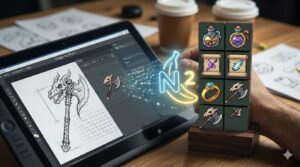
The transition from manually drawing every single UI element to leveraging AI generation represents a fundamental shift in efficiency. Nano Banana 2 is uniquely engineered to bridge the gap between creative vision and rapid asset execution, specifically optimized for the constraints of pixel art.
Redefining Pixel Icon Creation Pipelines
Massive Batch Processing Power
The defining advantage of using this advanced system is its ability to generate enormous quantities of assets simultaneously. Traditional AI image generation tools often require generating images one by one, which is counterproductive for creating a full RPG inventory system. Nano Banana 2 thrives on high-volume workflows, allowing you to queue up prompts for hundreds of items and generate them all in a single operation. This capability turns asset creation from a daily chore into a single afternoon task.
Unprecedented Stylistic Consistency
When generating a large batch of items, ensuring they all look like they belong in the same game is critical. Other models struggle with consistency over large numbers, introducing unwanted stylistic drift. Nano Banana 2 includes advanced fine-tuning and reference image consistency controls, allowing you to feed in a single “anchor” icon (like a 32×32 rusted sword) and generate 500 other weapons that adhere perfectly to that specific color palette, shading style, and pixel grid alignment.
Native Understanding of Pixel Grid Constraints
Generic image generators are designed for high-resolution photo-realism and often produce “blurry” or “anti-aliased” results when asked for pixel art. This system features a specialized ‘pixel-native’ upscaling and generation architecture. It intrinsically understands concepts like “pixel-perfect edges,” integer scaling (avoiding half-pixels), and restricted 8-bit color palettes. This ensures that the generated output is immediately usable in your game engine without requiring extensive, frustrating clean-up in an external editor.
Essential Use Cases for AI-Driven Game UI
The flexibility of Nano-Banana 2 extends across multiple game genres and asset categories, providing immediate utility where inventory systems are central to gameplay.
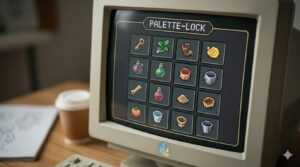
Retro pixel icon palette management result example
Populating Infinite Loot Tables
In a rogue-like or a procedural RPG, you need thousands of distinct loot drops to keep exploration rewarding. Manually drawing 300 different kinds of ‘leather armor boots’ is impossible for a small team. The AI excels here: prompt the generator with “pixel art 32×32 leather boots, variant 1,” “variant 2,” etc., and use randomized color seed inputs. The tool will output hundreds of unique sprites, ready to populate your procedural generation algorithms.
Designing Cohesive Ability and Spell Icons
Game spells and abilities are often the most colorful and thematic UI elements. Using Nano Banana 2, you can define a consistent ‘magical glow’ reference style for your wizard character and generate 100 unique icons—ranging from fireballs to lightning bolts—that all share the identical magical signature. You can easily create distinct icons for passive skills (e.g., green shields) and active abilities (e.g., orange swords) by adjusting the prompt parameters while locking the master asset style.
Creating Tiered Equipment Upgrades
RPG progression relies on equipment looking progressively “cooler.” A starting ‘iron chestplate’ needs a corresponding ‘steel chestplate,’ ‘mithril chestplate,’ and finally ‘dragonscale chestplate.’ By using a base image of the iron chestplate as a semantic reference, you can use text prompts to instruct the AI to “upgrade to gold trim,” “add glowing runes,” or “apply black dragon scales,” generating the entire upgrade tree in sequence.
Standardizing Currency, Consumables, and Junk Items
Don’t waste precious development hours drawing stacks of gold coins, different colored health potions, or useless “vendor trash” items. These repetitive assets are the perfect candidate for AI batching. Generate complete sets of consumables (small, medium, large potions of health, mana, stamina) simultaneously, ensuring the glass bottles and liquid shading are perfectly consistent.
Designing Faction and Guild Heraldry
If your game features multiple factions, each needing unique logos or banners, you can generate hundreds of 64×64 crests with varying iconography (lions, eagles, anchors, etc.) but keeping a consistent ‘engraved metal’ or ‘ancient tapestry’ style. The AI handles the complex composition and shading within the strict pixel constraint.
Rapid A/B Testing of Icon Palettes
Not sure if your UI should be dark and gritty or bright and vibrant? Instead of committing hundreds of hours to a direction you might abandon, use Nano Banana 2 to instantly re-palette an entire batch of 500 generated icons. You can see how a complete armor set looks in a ‘crimson’ palette versus a ‘void-purple’ palette in minutes, enabling rapid visual iteration and better overall UI cohesion.
Core Workflow Features of Nano Banana 2
Understanding how to control the model is essential for predictable, high-quality output. These features empower solo devs to handle massive asset loads professionally.
Image-to-Pixel and Semantic Consistency
The most powerful combination for game assets is using an image input alongside your text prompt. If you have a sketch of a unique sword or an existing 2D asset you want to convert into a 32×32 sprite, you use the “Image-to-Pixel” feature. You upload the reference image, set the desired resolution, and the model transforms the image while respecting its semantic structure and core features. Crucially, you can generate entire batches based on this single input, ensuring all outputs inherit the reference asset’s core properties.
Batch Palette Management
This feature addresses the biggest headache of hand-drawn pixel art consistency: managing a color index. Nano Banana 2 allows you to define a 16-color or 256-color palette (common in classic gaming systems) and force all generated icons to adhere strictly to that palette. This eliminates color drifting and ensures that when you see a generated sword next to a generated potion, they share a cohesive visual DNA.
Multi-Seed Variety Generation
When batching, you don’t just want quantity; you want controlled variation. The “Multi-Seed Generation” option allows you to input one prompt (e.g., “pixel art 32×32 iron helmet”) and generate 50 distinct variations of that exact prompt in a single run by automatically iterating through different random seeds. You can then quickly review the contact sheet, pick the 10 best helmets, and discard the rest, saving massive amounts of selection time.
Layered Composition for Complex Icons
For complex UI elements like “socketed items” (an armor piece holding gems) or “augmented weapons” (a sword glowing with electric energy), this model supports layered generation. You can generate a weapon base layer and a secondary augmentation effect layer independently, ensuring they align perfectly on the pixel grid when composited. This allows for dynamic UI elements in your game engine (e.g., turning the ‘electric glow’ effect on or off).
Conclusion: Build Massive Inventories Fast
Indie game development is often a war against time and resources. The ability to populate your game with thousands of unique, thematic, and pixel-perfect assets in a matter of hours removes a significant obstacle to completing large-scope projects. By mastering the batch processing, image-to-pixel consistency, and native grid controls of Nano Banana 2 free, solo and small-team developers can finally compete on asset volume with larger studios. Stop drawing hundreds of icons by hand; embrace the power of AI to build deep, immersive, and visually consistent inventory systems faster than ever before.









Leave a Reply