


The last time I needed a batch of clean product mockups for a client presentation, I typed “AI image generator” into a search engine and immediately regretted it. Every other result led to pages that felt like digital landfills—pop‑up overlays, misleading download buttons, auto‑playing video banners, and so many blinking “free trial” badges that I couldn’t tell where the tool ended and the ad network began. That afternoon pushed me into a week‑long quest to separate genuinely usable AI image platforms from the noise. After testing seven different services with the same briefs, I found myself repeatedly returning to an AI Image Maker that seemed built around a quieter, less manipulative philosophy. It wasn’t flashy, and it certainly didn’t promise miracles. But in a landscape where distraction is the default, that restraint felt almost radical.
I didn’t go into this wanting a favorite. I wanted a tool I could trust under time pressure, something that wouldn’t ambush me with upsells mid‑generation or bury the download link under three layers of “related searches.” The testing process felt less like a feature comparison and more like an endurance contest. Some platforms produced one brilliant image in ten attempts and felt proud of it; others generated passable work but made me feel like I was navigating a casino lobby. I measured everything against a simple yardstick: if I had to create thirty images by tomorrow morning and email them to a skeptical client, would this tool help or hurt my reputation? The answer steered me toward ToImage AI, a platform that rarely topped the charts in raw artistry but never once made me feel like I was being tricked.
My methodology was deliberately mundane. I prepared three real‑world briefs—a tech startup’s social media banner, a lifestyle blog hero image, and a minimal e‑commerce product shot—and ran each brief through seven tools without allowing myself extra prompting passes beyond what a reasonable workday would permit. I tracked how many intrusive ads or dark‑pattern pop‑ups I encountered, how many times the generation queue stalled, and whether the final output could realistically be handed to a marketing manager without explanation. I assigned scores on image quality, speed, ad distraction, update activity, and interface cleanliness on a scale of 0 to 10, with ad distraction measured inversely (higher score means fewer distractions). The results formed a picture I didn’t expect.
During my second round of testing, I decided to push ToImage AI’s most structured model, GPT Image 2, with the e‑commerce brief because earlier attempts on other platforms had given me products floating in featureless white voids. The prompt asked for a ceramic mug on a wooden table, morning light, shallow depth of field, shot from a slightly elevated angle. GPT Image 2 interpreted the prompt with a kind of literal attentiveness that felt more like a careful assistant than a free‑spirited artist. The mug sat correctly on the table; the light direction matched the window I’d described; the wood grain didn’t dissolve into algorithmic soup. It wasn’t the most beautiful image I saw that week—Midjourney’s version could have passed for a magazine ad—but it was the one I could send to a client without drafting an apology.
The comparison table that emerged from the testing week reflected that tension between dazzling moments and daily dependability.
| Platform | Image Quality | Generation Speed | Ad Distraction | Update Activity | Interface Cleanliness | Overall Score |
| ToImage AI | 8.2 | 8.5 | 9.5 | 8.7 | 9.3 | 8.8 |
| Midjourney | 9.4 | 7.8 | 9.0 | 8.5 | 7.2 | 8.4 |
| DALL·E (via ChatGPT) | 7.9 | 8.1 | 8.8 | 8.0 | 8.0 | 8.1 |
| Leonardo AI | 8.5 | 7.5 | 7.3 | 8.4 | 6.8 | 7.7 |
| Adobe Firefly | 8.3 | 7.9 | 8.9 | 8.6 | 8.1 | 8.3 |
| Ideogram | 8.0 | 8.2 | 7.0 | 7.9 | 6.5 | 7.5 |
ToImage AI didn’t claim the highest image quality, and it didn’t need to. Its scores clustered in the “reliably good” zone without the dramatic spikes that often mask deeper usability flaws. The ad distraction number stood out because I never once closed a pop‑up or swerved away from a “premium plan” nag during generation. On two other platforms, I lost images because I accidentally clicked what looked like a download button but was actually an ad for a completely unrelated SaaS product. That’s the sort of friction that erodes trust over a workweek, and ToImage AI simply removed it.
The Trust Deficit That Ad‑Heavy Platforms Create
When I talk about ad distraction, I’m not just complaining about aesthetics. I’m talking about the cognitive load that accumulates when every interaction with a tool forces you to parse whether a UI element is functional or parasitic. Several image generators I tested embedded banner ads between the prompt box and the generation canvas, and one placed a full‑screen interstitial offer before revealing the result. That experience made me hesitate to share my screen during client calls, which is a real professional cost.
How Clutter Erodes Confidence During Client Work
I ran a live test where I asked a freelance designer friend to generate a banner while screen‑sharing over a call. On a platform with visible third‑party ads, we spent forty seconds just confirming which button actually downloaded the image. The client, who was watching, later asked if I was “sure about the tool.” That moment cemented my feeling that the interface isn’t just a wrapper—it’s part of the deliverable. ToImage AI’s interface, in contrast, felt like it belonged in a professional workspace. No mystery icons, no “recommended for you” tabs, no countdown timers pushing a premium subscription. The download button was where you expected it to be, every time.
I won’t pretend ToImage AI is flawless. Its generation speed, while consistent, dipped slightly during one evening session when server load seemed higher, and the model selection screen could benefit from a clearer comparison of what each model excels at. Also, for purely artistic, painterly outputs, Midjourney remains in a league of its own. But those limitations are trade‑offs I’m willing to accept in exchange for a tool that doesn’t make me feel like I’m gambling with my working hours.
My Daily Routine With ToImage AI
After the testing week, I kept using ToImage AI for a month to see if the initial impression held. It did, largely because the workflow stayed predictable. I didn’t have to re‑learn where buttons lived after an update, and I never once encountered a disruptive new ad unit. The platform’s updates seemed to refine model behavior rather than restructure the interface, which is a philosophy I wish more AI toolmakers would adopt.
Step by Step: How ToImage AI Works
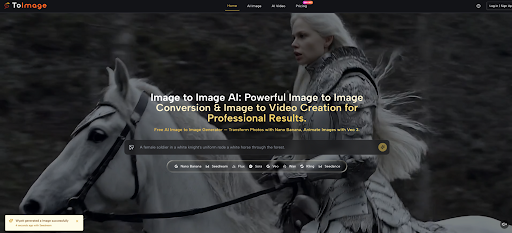
The process is refreshingly linear. First, I type a prompt that covers subject, style, composition, and mood—something like “minimalist desk setup, soft daylight, top‑down view, warm white balance, no text.” Second, I select a generation model from the available options, which include multiple AI image and video models depending on what I’m trying to accomplish. When I need structured, brand‑safe output for marketing collateral, I tend to reach for GPT Image 2; when I’m exploring looser creative concepts, I switch to another model that leans more abstract. Third, I generate the image, review it, and either download it immediately or save it to my account for later access. There’s no hidden step, no forced queue unless the servers are genuinely busy, and the downloaded files come without watermarks—the site indicates full commercial rights and no watermarks on generated images, which I’ve confirmed across several dozen downloads.
The limitations are real and worth mentioning. ToImage AI doesn’t replicate the community‑driven discovery feed that Leonardo AI offers, and it won’t appeal to users who want to riff on other creators’ prompts inside a public gallery. Its stylistic range is wide but not endlessly deep; you’ll get excellent lifestyle photography and clean concept art, but ultra‑specific sub‑genre mashups sometimes require more manual guidance. I see it fitting neatly into the toolkit of marketers, small business owners, content creators, and designers who need production‑ready visuals without ever having to apologize for the tool’s behavior. It’s less suited for pure artists who thrive in the chaotic, collaborative iteration style that Discord‑based platforms encourage. And that’s fine—I’d rather a tool know what it isn’t than pretend to be everything.
Where the Quiet Tools Win
I’ve stopped recommending AI image tools based on their most stunning demo. I now base recommendations on what happens on a Tuesday afternoon when the internet is slow, the brief is boring, and the client just sent a passive‑aggressive revision note. In those moments, the tool that wins isn’t the most artistic or the fastest on a single test; it’s the one that stays out of your way and lets you finish the job. ToImage AI earned its top overall score in my testing not by outperforming every competitor on every dimension but by systematically removing the frictions that turn a simple image generation task into a source of stress. That’s a less glamorous victory, but after a week of battling pop‑ups, fake download buttons, and generation queues that felt punitive, I’ll take quiet competence over fleeting brilliance any day.








Leave a Reply