

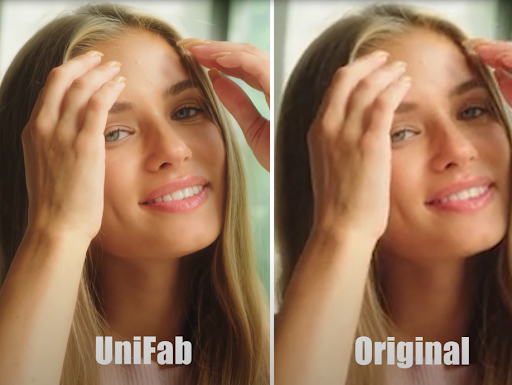
Whether you publish videos for work or simply enjoy documenting everyday life, you’ve probably had this experience: you capture a great moment, only to find later that the footage is grainy, too dark, or not as sharp as you expected. With so many creators and brands competing for attention, video quality has become something viewers immediately notice—often before they pay attention to the message itself.
This article walks through the essential steps of improving video clarity, stability, and overall visual appeal. It begins with practical filming tips that anyone can use, then moves into how modern AI tools—especially UniFab Video Enhancer AI—can help you transform imperfect footage into something far more polished.
Why Video Quality Matters More Than We Think
People often talk about “good content,” but quality is part of the content too. Clearer footage affects a video’s performance in several ways.
1. Viewers stay longer when visuals are easy on the eye
Imagine opening a video that looks blurry or filled with noise—most people swipe away within seconds. High-quality visuals remove that barrier and keep people watching.
2. Strong visuals build trust
Whether it’s a product showcase or a travel vlog, viewers naturally associate better image quality with professionalism and reliability.
3. Platforms reward better-looking videos
While algorithms are complex, clearer, higher-resolution videos tend to deliver better engagement, which indirectly increases the likelihood of being recommended.
Before Editing: Simple Habits That Make a Big Difference
Even in an age of smart software, what you do during filming still matters. A few small adjustments can lift your video quality before you begin any post-processing.
1. Light is your most reliable friend
Even an affordable camera can perform well with strong, soft light. If you film indoors, face a window whenever possible. Outdoors, filming during morning or late-afternoon hours can avoid harsh shadows.
2. Keep your camera steady
Shaky footage can make even a beautiful scene look amateur. A tripod, a stabilizer, or simply resting your elbows on a firm surface can help tremendously.
3. Record at the highest resolution available
Shooting in 4K or 1080p gives you more room to crop or stabilize later, and the original file contains richer detail for your editing tools to work with.
These basics won’t solve every issue—especially shots from old devices, night scenes, or fast-moving subjects—but they give you the strongest starting point.
When Basic Editing Isn’t Enough: The Role of Modern AI
In recent years, AI-powered video tools have quietly reshaped how people fix imperfect footage. Instead of manually adjusting dozens of settings, creators can rely on intelligent algorithms that analyze each frame and repair issues automatically.
One tool that stands out for practicality and consistency is UniFab Video Enhancer AI. While plenty of apps promise “instant fixes,” UniFab focuses on realistic improvements rather than overly sharpened or artificial results.
UniFab Video Enhancer AI: An Easy Way to Upgrade Your Footage
Instead of overwhelming users with complicated panels, UniFab takes a straightforward approach: import the clip, choose the enhancement mode, and let the software handle the heavy lifting.
1. AI Upscaling for Clearer, Higher-Resolution Video
UniFab’s AI Video Upscaler can upgrade old or low-quality videos to 4K, 8K, or even 16K. What makes the tool useful is that the enhanced footage still looks natural—not overly processed.
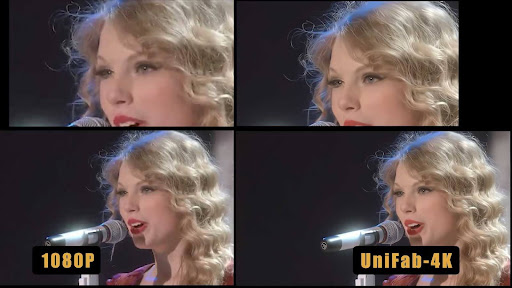
2. Effective Noise Reduction and De-blurring
Footage shot in dark spaces or with older phones often suffers from heavy noise. UniFab’s algorithm reduces this without flattening the image, and motion blur from fast movement can also be noticeably improved.
3. Bringing Old or Damaged Footage Back to Life
Many users rely on UniFab to restore family videos, travel recordings, or material from older cameras. Brightness, contrast, and sharpness are adjusted in a balanced way, making the footage look like a newer recording.
4. Designed for users of all levels
You don’t need editing experience. The interface is clean, and the default presets already cover most use cases.
5. Faster processing with stable output
Because the software is optimized for efficiency, it processes videos quicker than many traditional editors—especially when handling long clips or high resolutions.
Who Can Benefit from These Enhancements?
- Short-form creators trying to stand out in a crowded feed
- Marketing teams who need professional-looking promotional material
- Vloggers and influencers seeking better aesthetics without expensive gear
- Families and everyday users restoring personal memories
- Teachers and companies improving the clarity of instructional videos
The adoption of AI in video production isn’t about replacing creativity—it’s about giving creators more freedom by removing technical obstacles.
Final Thoughts: Getting Better Videos Is No Longer Complicated
A decade ago, improving video quality required expensive tools, advanced editing knowledge, and hours of manual adjustments. Today, thanks to solutions like UniFab Video Enhancer AI, the process is accessible to anyone. You can record spontaneous, imperfect moments and still turn them into high-quality content with just a few clicks.
If you’ve been struggling with low-quality footage or simply want your videos to look cleaner and more professional, UniFab Video Enhancer AI is a practical tool worth trying. It blends the ease of automation with results that still look natural—helping your content shine on any platform.













Leave a Reply